

Teach engaging computer science and AI lessons with imagi Edu
Unlock ready-to-teach lessons that keep students hooked. Fun, creative, and 100% aligned with most major standards and frameworks.






Plug-and-play computer science and AI lessons for grades 3-12
Teach Python, introduce AI with confidence, and make computer science fundamentals exciting. No prior tech knowledge needed – learn alongside your students.
✓ Full lesson plans and materials provided
✓ AI-assisted debugging to keep momentum going
✓ Works on Chromebooks, laptops, and tablets
✓ imagiCharms let students bring their code to life (optional)
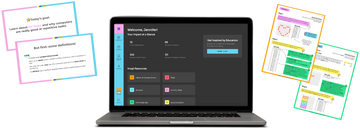

Full support for teachers
Access tutorials, materials, and a dashboard for monitoring student progress.

Computer Science that fuels curiosity
100% of teachers reported that students’ tech confidence improved after using imagi Edu.

Own the AI conversation
Introduce AI confidently, and lead conversations about appropriate usage.
Loved by educators around the world



























Tangible learning with imagiCharms
Deepen student understanding and engagement using optional imagiCharms - programmable devices that allow students to hold their coded projects in their hands.
✔ Pairs via Bluetooth
✔ Up to 4 students can share each charm
✔ Battery lasts for 6 hours with normal use

Preview our curriculum and scope
✓ 100+ hours of lessons
✓ 100% aligned to most major standards & frameworks
✓ Clear learning targets for each class
✓ Lessons can be split to suit your class structure
✓ Students work independently or in groups
✓ Unique cross-curricular activities
100% aligned to most core standards and frameworks
Computer science curriculum requirements are always evolving – and we’re evolving alongside them.


School Success Stories
We caught up with three teachers who led the charge to get imagi Edu at their schools, and haven’t looked back since. Find out how it went down.


Coding Confidence: How Michael Drezek Makes Computer Science Click for Every Student
How Ms. Robotics Uses imagi to Spark a Love for Computer Science
Inclusive Innovation in EdTech: a Thread Throughout an Educator's Journey to imagi
Simple and inclusive pricing
We believe every child should have access to good computer science classes. Teach your first three classes for free to see if we’re a good fit, or request a quote (we’ll get back to you within 1-2 business days).
“But how will I get this signed off on?”
Here are a few reasons why principals and administrators find imagi Edu a great investment.
Chat with our friendly team
We are always here to answer your questions or show you how to best utilize our tool. If you are interested in our product and would like an introductory demo, book a session with us!

For Teachers
Frequently Asked Questions
I’ve never taught computer science before. Is this right for me?
Absolutely! We’ve designed our curriculum to be suitable for teachers with a mixed level of experience. We offer onboarding to get you started on our platform, as well as full lesson plans and materials. You’ll love learning alongside your students.
See all our resources for teachers for more info.
Which grades can I use imagi Edu with?
imagi Edu was designed for kids in grades 3-8, but many 9th grade educators use imagi Edu as well. If a district does not teach line coding prior to high school, imagi Edu can be used in grades 9-12th as well. If you’d like to discuss your class setup and requirements with us, book a demo or email our team: sayhi@imagilabs.com. We’d be happy to chat about whether or not imagi Edu fits into your schools needs.
How quickly can I start teaching classes?
You can bring imagi Edu to your classroom as soon as tomorrow.
As soon as you download imagi Edu, you are able to bring the lessons to your classroom. After setting up your educator account on imagi Edu, you need to create your classroom (2-5 minutes). After making your classroom, you can download the student login credentials PDF instantly, familiarize yourself with the first lesson slides, and you are all set to bring imagi Edu to your class!
Which devices are compatible with imagi Edu?
imagi Edu is designed for use on Chromebooks, tablets (iOS and Android), and other internet-connected laptops. Our web platform works with any browser. Please note that Bluetooth needs to be enabled for imagiCharms to connect.
Why do you include AI classes for kids?
AI is here to stay, and we think it’s important that schools take a proactive approach to engaging with it. There’s a push to make AI classes a requirement in schools in the US, and some colleges are also making AI classes mandatory – either as an entry requirement or as a compulsory course.
We know this is new ground for many teachers, and we’re here to support you and provide you with everything you need to teach AI essentials with confidence.
Do I need the imagiCharms?
No! imagi Edu still works without the imagi Charms, but we do find that the tangible outcome makes these classes much more engaging for students, so we would encourage you to consider them. Book in a demo, and let’s chat about what your school needs.
Is the imagi Edu platform safe for kids (GDPR/COPPA compliant)?
Yes, the imagi Edu platform is safe for kids and complies with GDPR and COPPA regulations. Educators have full control over creating and managing student accounts. The platform does not require any personally identifiable information from students, ensuring their privacy and safety. We also do not currently connect with any learning management systems. Please find our full Privacy Policy here.
What if I don’t know how to code?
No coding experience? No problem! The imagi Edu platform is designed with beginners in mind. It’s easy to use, and we provide step-by-step resources and support to help you and your students succeed.
I need more information, how do I get in touch?
Our team is happy to support! Please email us at education@imagilabs.com with any questions.